

Think about your day online. You search for an answer, watch a quick video, scroll a social feed, check a delivery, maybe ask an AI tool to summarize something. Whether you’re browsing an online store, reading a blog, or researching agencies on platforms like https://www.designrush.com/, these are small moments, but they quickly stack up.
Now picture the same routine with a lag. The page shows a blank screen, buttons don’t respond, the layout shifts right as you tap. You feel unsure and annoyed. Is this site broken? Is it safe? Should I bother?
That’s why website speed and performance matter more than ever. Most browsing happens on phones, pages carry more weight (video, ads, tracking, AI features), and Google still pays attention to real user experience signals like Core Web Vitals.
What “fast” really means in 2026
“Fast” isn’t only about a stopwatch. It’s about what your brain notices first.
A page can finish loading in the background while you stare at a white screen. Another page can still be loading, yet it feels ready because you can read, scroll, and tap right away. That difference is the whole point.
Speed also feels personal because it connects to emotion. When something responds quickly, we relax. When it doesn’t, we assume the site is low quality, even if the product is great. It’s like a store with a sticky door. You haven’t even walked in, and you’re already judging.
Google’s Core Web Vitals push teams to measure what real people experience, not what a server log claims. In 2026, the big three are:
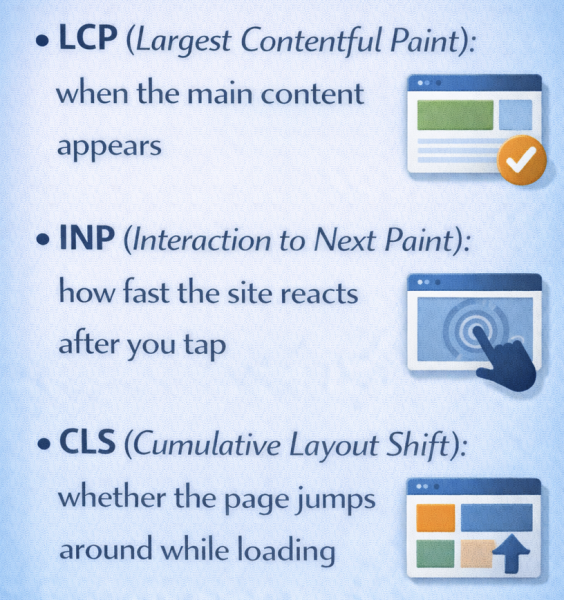
These describe the moment a visitor decides, “This works” or “I’m out.”
The user doesn’t care when everything finishes. They care when it becomes usable.
The moments users notice most
Two loading milestones shape first impressions.
FCP (First Contentful Paint) is when anything useful shows up, like text or a header. LCP is when the most important part appears, like the hero image, product title, or the first paragraph of an article.
Then comes the make-or-break part on mobile: interaction. INP measures how quickly the page responds after you click or tap. If you tap “Add to cart” and nothing changes for a beat, your confidence drops.
Finally, CLS covers the most rage-inducing issue of all: stuff moving. You go to tap a product size, the page shifts, and you hit “Buy now” by accident.
Good target ranges most teams aim for
| Metric | What it means in plain English | Practical target many teams aim for |
| TTFB | Server starts responding | Under 500 ms (under 200 ms is a strong goal) |
| FCP | First useful content appears | Under 1.8 s |
| LCP (Core Web Vital) | Main content appears | 2.5 s or less |
| INP (Core Web Vital) | Tap to visible response | 200 ms or less |
| CLS (Core Web Vital) | Page stays still | 0.1 or less |
| Speed Index (lab) | How fast the page fills in visually | Under 3.4 s (often 3 to 4 s is considered solid) |
Why performance matters more than ever for everyday sites
Performance used to be a nice improvement. Now it’s the experience.
People bounce faster because they’re trained by the best apps and sites they use daily. Social feeds load endlessly. Video apps buffer less. Search results feel immediate. Even immersive technologies like virtual reality and augmented reality are setting new expectations for responsiveness and smooth interaction.
That becomes the baseline, even when you run a small business site or a niche blog.
There’s also a gap between networks and reality. Yes, 5G and Wi‑Fi keep improving. Yet pages also keep getting heavier. Ads, trackers, consent tools, chat widgets, A/B testing, and personalization scripts all add up.
Industry research often shows a simple pattern: visitors commonly leave after about 3 seconds, and each extra second can reduce conversions.
Speed is attention, slow pages raise bounce rates
The bounce rate is just “people who came, then left without doing anything.” No second click, no scroll, no search, no add to cart.
When a page feels slow, bounce rate rises because you’ve asked for patience before you’ve earned trust. On mobile, that problem gets worse because taps are frequent and interruptions are normal.
Even loyal users compare you to their fastest experiences. If your search box lags or your article takes too long to become readable, they don’t think, “This is a smaller site.” They think, “This site is frustrating.”
How to 3X Increase your Site Speed (FREE)
Performance is money: sign-ups, carts, and ads all depend on it
Speed hits revenue in obvious places and sneaky ones.
Checkout flows suffer when buttons respond late, payment forms stutter, or address lookups lag. Subscription sites lose sign-ups when the pricing page feels heavy. Content sites lose ad revenue when people don’t stick around long enough for a second page view.
Small delays also break momentum. Each one is a tiny reason to quit. Every extra second of load time on the checkout page decreases your sales by 7%.
Speed protects trust, especially with AI and personalization
AI features can help, but they can also slow things down. A chat widget that blocks the page, an AI summary that pops in late, or personalized modules that shift the layout can make a site feel unreliable.
Users don’t separate “AI is thinking” from “this site is broken.” They just see waiting. Concerns about AI’s effect on children and attention patterns are already being discussed in academic and psychological circles, which makes responsiveness even more important. If younger users grow up expecting instant feedback, tolerance for delay shrinks even further.