

When deadlines stack up, the problem usually is not effort. It is time. You are staring at a worksheet or a messy screenshot from a class chat, and you need an explanation you can actually follow. That is the lane aihomeworkhelper.com tries to own.
The platform positions itself as an AI homework helper free option that answers questions fast and explains the “why” behind the solution. It also leans hard into uploads, which is important when your task lives in a photo, a PDF, or a crooked picture of a whiteboard.
Let us break down what the tool does well, where it feels limited, and how it fits into student routines at school.
What AIHomeworkHelper Is and How It Works
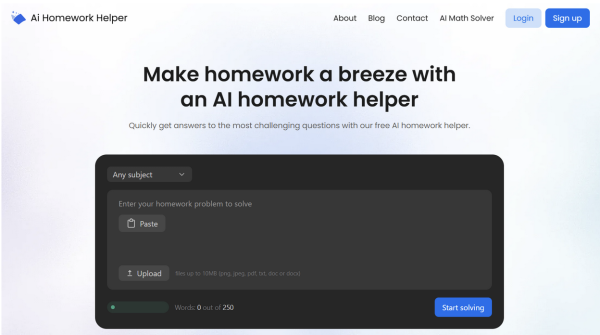
AIHomeworkHelper.com is a browser-based homework assistant built around one core flow: give it a question, get an answer with steps. You can type a prompt, paste text, or upload a file (which is a big deal because plenty of assignments arrive as images, scanned pages, or PDF exports).
Here is the typical process:
- Drop in your prompt or upload a file (image or PDF).
- Submit and wait a few seconds.
- Read the response and follow the steps.
- Ask a follow-up if something is unclear.
The upload experience feels like it was designed by someone who has actually tried to retype a geometry problem from a blurry photo. The built-in scanner-style handling is the point.
A key promise is explanation quality. Many tools can spit out an answer. Fewer tools consistently show the reasoning in a way that is usable for learning, checking work, or fixing a wrong turn.
What It Can Do Across Subjects and Academic Levels

AIHomeworkHelper aims to cover the practical set of tasks students deal with most often. Think STEM problems, short-answer questions, concept explanations, and writing support in smaller chunks.
The tool is most useful for:
- Solving math and showing the steps
- Breaking down science concepts in plain language
- Explaining history or social studies questions with context
- Helping with English tasks like analysis, structure, and revision
The tool also tries to scale difficulty. A middle-school explanation should not read like a graduate lecture. A college-level question should not get a watered-down reply that dodges the hard parts. When that works, it feels like tutoring-style assistance rather than a generic bot response.
Accuracy and Explanation Quality
Across math, science, and humanities-style prompts we paste into the tool, the stronger answers share the same pattern:
- It states the goal clearly.
- It lays out steps in a logical sequence.
- It shows intermediate reasoning instead of jumping to a conclusion.
- It keeps the language at a level that matches the prompt.
This is where the tool behaves like an AI homework generator in the best sense. It generates a complete solution path, not just a final line.
Uploads, OCR, and the “Picture to Solution” Workflow
AIHomeworkHelper.com uses OCR to read text from images and scanned PDFs. In plain terms, it turns a picture into a prompt. When it works well, it feels like a fast scanner built into a homework assistant.
The upload workflow is strongest for:
- Worksheets with clean printed text
- Math problems with standard symbols
- Typed PDFs exported from learning platforms
- Photos that are slightly messy but still readable
OCR is rarely perfect across every format. Handwriting, heavy shadows, or extreme blur can still cause mistakes. The difference is that here, you usually notice the issue quickly because the tool’s response will reflect the misread part. When that happens, the fix is straightforward: re-upload a clearer image or type the missing line.
Speed and Day-To-Day Usability
The interface is simple enough that it stays out of your way. You do not need a tutorial to get started. You open the page, paste text or upload a file, and submit.
Response speed is quick. Most outputs land in seconds. That speed matters when you are working between classes or trying to finish an assignment before a work shift.
It also helps that you are not pushed into an account creation step just to test the tool. Tools that demand sign-up before you can even try a basic prompt tend to lose students immediately. AIHomeworkHelper.com keeps the entry barrier low.
When AI Is Helpful and When It Backfires
AI for homework works best when you treat it like a tutor and editor, not a vending machine for final answers. The tool is strongest in these roles:
- Explaining a concept you missed in class
- Walking through the steps so you can learn the method
- Helping you check your work before submitting
- Showing you where your reasoning went off track
- Giving you an example structure for a short response
It backfires when you try to outsource thinking completely. Teachers change numbers, ask questions in class, and spot weird reasoning jumps. A tool can help you learn faster, but it cannot protect you from submitting something you cannot explain.
A safer habit is this: read the steps, then redo the problem without looking. If you can recreate the method, the tool did its job. If you cannot, ask for a follow-up that targets the exact step that confused you.
Best Use Cases in a Busy Week
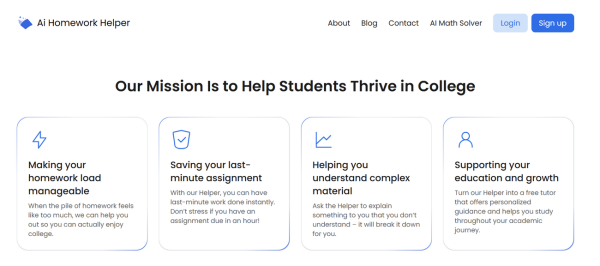
The tool fits best into the moments when you are stuck, tired, or short on time. That is most weeks.
Use it for home work help when you need one of these outcomes:
- A step-by-step walkthrough you can study from
- A quick check to confirm your final result
- A clearer explanation than your notes provide
- A translation from “textbook language” into student language
- Support turning messy prompts into workable solutions
It is also useful for planning. If you have several assignments due, you can use it to triage what will take longer. A fast explanation can reveal whether a problem is simple once you see the method or whether it will require more study time.
Handling a Homework Question Without Getting a Shallow Answer
The quality of your prompt still matters. If you want a strong result for a homework question, give it enough context to aim properly.
These quick tweaks improve output:
- Include the exact question text, not your summary
- Add any constraints (show work, use a specific method, cite a rule)
- Mention your grade level if the topic can be taught in multiple ways
- If you upload an image, confirm key numbers or symbols in text
If the response feels vague, do not start over with a brand new prompt. Ask for a precise follow-up. For example: “Explain step 3 in simpler terms,” or “Why did you choose that formula?”
Solving Problems While Keeping Your Work Honest
For homework problems, you want to finish with:
- The right answer
- A method you understand
- A clear explanation you could repeat
- Fewer mistakes on the next similar problem
That is where the tool’s step-by-step style can help.If you can quickly get the method for a problem, you can spend your time practicing instead of wrestling with formatting.
One more practical tip: save your best explanations. When the tool gives a clear breakdown, copy it into your notes as a study guide. That turns one solved question into future study material.
Pros and Cons of AIHomeworkHelper
Pros
- Fast answers with step-by-step reasoning, which makes the final answer easier to trust
- Upload support for images and PDFs, helpful for screenshot-based assignments
- OCR workflow feels like a built-in scanner, reducing manual retyping
- Works well as a study companion for checking work and learning methods
- Simple interface with a low barrier to entry
Cons
- OCR quality can still dip with heavy blur, messy handwriting, or dark shadows in a picture
- Results depend on prompt clarity, especially for multi-part questions
- Language support may feel limited for students who need full multilingual output
Wrapping Up Our Findings
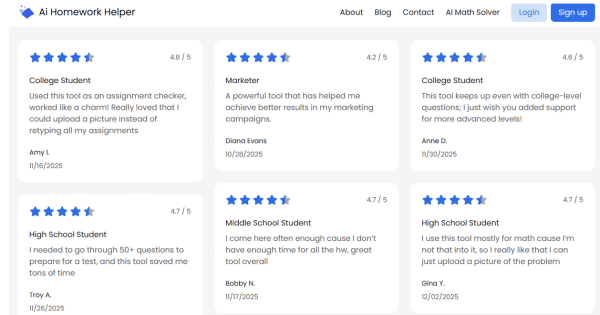
AIHomeworkHelper.com is most useful for students who want fast explanations, not just quick outputs. If your week is full of assignments and time pressure, the upload workflow alone can make the tool worth using. The step-by-step reasoning is what turns it from a novelty into something that actually helps you study.
Treat it like a tutor: ask good questions, request clarification, and use the steps to learn the method. Good luck with becoming more efficient in your studies!